Intelligently Filter Events on Individual Pages
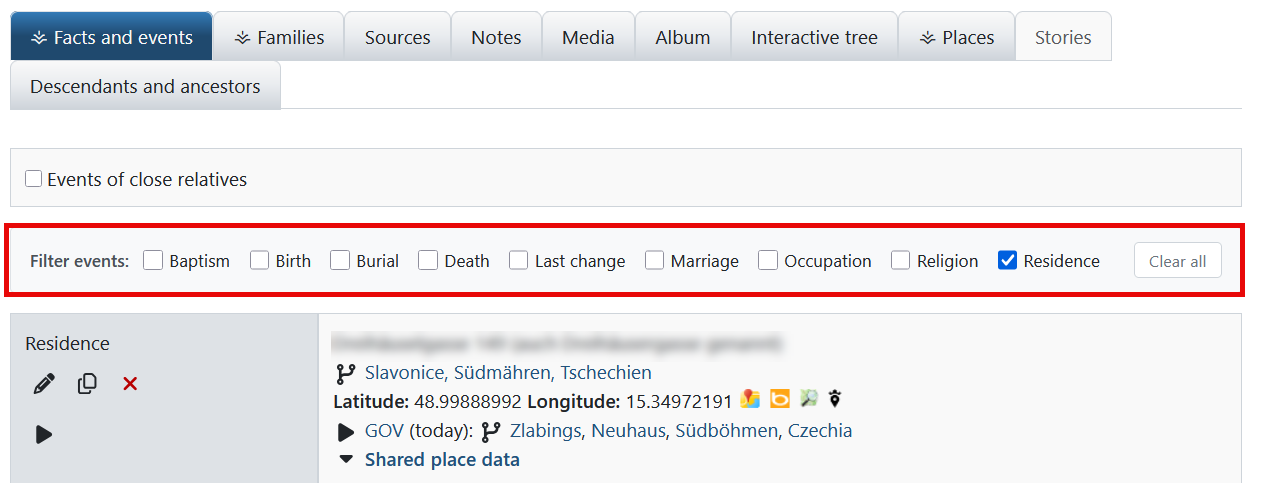
The Event Filter Module allows you to selectively filter events on individual pages. With intelligent OR logic, automatic type detection and localStorage persistence.
Quick Start – Get Started Immediately!
- Download module: Get ZIP file from the homepage
- Upload: Extract to
/modules_v4/wt-event-filter/ - Enable: In Webtrees under "Control panel → Modules → All modules"
- Use: Open an individual page – the filter bar appears automatically!
Client-side
No server reload
Automatic
Only existing types
Persistent
Selection is saved
1 Download Module
Download the ZIP archive from the homepage and extract it.
2 Upload Files
Upload the wt-event-filter folder to the /modules_v4/ directory of your Webtrees installation.
webtrees/modules_v4/wt-event-filter/module.php
3 Enable Module
- Log in as administrator to Webtrees
- Go to Control panel → Modules → All modules
- Search for "WT Event Filter"
- Enable the module by clicking the switch
Basic Usage
- Open an individual page in Webtrees
- A filter bar automatically appears above the events list
- Select one or more event types by clicking them
- The events list is immediately filtered
- Click "Clear all" to reset the filter
Understanding Filter Logic
✓ All events are displayed
✓ Only birth events are displayed
✗ All other events are hidden
✓ All occupation events are displayed
✓ All education events are displayed
✗ All other events are hidden
→ OR connection: Shows events matching ANY of the filters
Persistence (Storage)
Compatibility
The module works with:
- ✓ Standard Webtrees "Facts and events" tab
- ✓ Vesta Facts and events module
- ✓ All common themes
Filter Doesn't Appear
- Is the module enabled? → "Control panel → Modules → All modules"
- Is JavaScript enabled in the browser?
- Does the individual page have events?
- Check browser console (F12) for error messages
Filter Doesn't Work with My Theme
The module uses configurable DOM selectors. If you have problems:
- Open the browser console (F12)
- Look for warnings like "Could not find facts tab container"
- Contact support with screenshots of the errors
Filter Selection Not Saved
- The browser supports localStorage (all modern browsers do)
- No browser extensions block localStorage
- The browser is not in private/incognito mode
- Cookies and site data are not deleted after each close
Events Are Not Filtered
- JavaScript error → Check browser console (F12)
- Theme incompatibility → Contact support
- Another module causing conflict → Test by temporarily disabling other modules
Technical Properties
- Client-side: Complete filtering runs in the browser, no server requests
- Performance: Debouncing (75ms) for large event lists
- No dependencies: Pure JavaScript, no jQuery required
- Defensive programming: Works even with DOM deviations
- Accessible: Proper labels, keyboard navigation, ARIA attributes
Customizing DOM Selectors
If the module doesn't work with your theme, you can customize the DOM selectors:
/modules_v4/wt-event-filter/resources/js/filter.jsContact support for help with customizations.
Supported Languages
The module is multilingual and supports:
System Requirements
| Webtrees: | Version 2.2.1 or higher (tested with 2.2.4) |
| PHP: | Version 8.0 or higher (recommended: 8.3+) |
| Browser: | All modern browsers with JavaScript enabled |
License
This module is free software and is published under the GNU General Public License v3.0.
webtrees: online genealogy

Copyright (C) 2025 webtrees development team


This program is free software: you can redistribute it and/or modify

it under the terms of the GNU General Public License as published by

the Free Software Foundation, either version 3 of the License, or

(at your option) any later version.


This program is distributed in the hope that it will be useful,

but WITHOUT ANY WARRANTY; without even the implied warranty of

MERCHANTABILITY or FITNESS FOR A PARTICULAR PURPOSE. See the

GNU General Public License for more details.
The complete license can be found at: https://www.gnu.org/licenses/gpl-3.0.html